

Integrating Ollama AI Models and Open WebUI on Docker#
Introduction#
Ollama, Opensource LLM Framework from Meta, provides a powerful way to work with large language models (LLMs) efficiently. While Open WebUI is a user-friendly interface that simplifies interaction with Ollama-hosted AI models. You can host Ollama and WebUI on your local machine. By using Docker, we can containerize these components, ensuring a seamless and reproducible setup across different environments. This guide will walk you through integrating Ollama and Open WebUI within Docker.
Prerequisites#
- “Windows 11 with WSL 2 enabled”
- “Docker installed and running within WSL 2”
- “Basic knowledge of Docker commands and YAML configuration”
- “Basic understanding of LLM working, Ollama framework, and Ollama model hosting”
Setting Up Open WebUI#
“Open WebUI allows users to interact with AI models easily. We will configure Open WebUI within a Docker container to make deployment straightforward. You can install WebUI on WSL2 directly or inside a Docker container. For the second option, it is best to pick up the ready-made image from Docker Hub, then download and install it in the WSL environment.”
Steps to Install Open WebUI:#
- “Pull the Open WebUI Docker image:”
docker pull open-webui/open-webui:latest - “Run the Open WebUI container:”
docker run -d --name open-webui -p 3000:3000 open-webui/open-webui - “Access the interface at
http://localhost:3000in your browser. Keep in mind that in the frontend, you will not see any Ollama model. Therefore, we need to download Ollama models using the WebUI frontend. But the problem with this approach is that these models will be deleted when you delete your container or Docker image (depending on how you set up). The second way is to download the model separately, find the location of the model, and attach that location as a volume (-voption) in the abovedocker runcommand.”
Configuring Docker for Ollama and Open WebUI#
“Now, there are two ways.”
Method 1: Configuring Ollama on WSL2#
“Ollama can be installed directly on WSL2, allowing seamless integration with Open WebUI running in a Docker container. This method provides better performance compared to running everything inside Docker.”
Steps to Install Ollama on WSL2:#
- “Update your system and install required dependencies:”
sudo apt update && sudo apt install -y curl - “Download and install Ollama:”
curl -fsSL https://ollama.ai/install.sh | sh - “Verify the installation:”
ollama --version - “Start Ollama in the background:”
ollama serve & - “Download and store Ollama models in a persistent volume:”
ollama run openthinker - “Run the Open WebUI container and mount the model directory:”
docker run -d --name open-webui -p 3000:3000 -v ~/.ollama/models:/root/.ollama/models open-webui/open-webui - “Now, Open WebUI should be able to detect the Ollama model stored in the mounted volume.”
Method 2: Configuring Ollama with Docker#
“To streamline deployment, we will set up a docker-compose.yml file to run Ollama alongside Open WebUI. We need Docker Compose when running multiple Docker containers simultaneously, and we want these containers to talk to each other to achieve a common application goal.”
Create a docker-compose.yml File:#
version: "3.8"

services:
  ollama:
    image: ollama/ollama:latest
    container_name: ollama
    ports:
      - "11434:11434"
    volumes:
      - ./models:/root/.ollama/models
    restart: unless-stopped
    command: ["sh", "-c", "ollama run openthinker"]

  open-webui:
    image: open-webui/open-webui:latest
    container_name: open-webui
    ports:
      - "3000:3000"
    depends_on:
      - ollama
    volumes:
      - ./models:/root/.ollama/models
    restart: unless-stopped
Running the Containers:#
- “Navigate to the directory where
docker-compose.ymlis saved.” - “Run the following command to start both containers:”
docker-compose up -d - “Open WebUI will be available at
http://localhost:3000, and Ollama will run on port11434with theopenthinkermodel available in Open WebUI.”
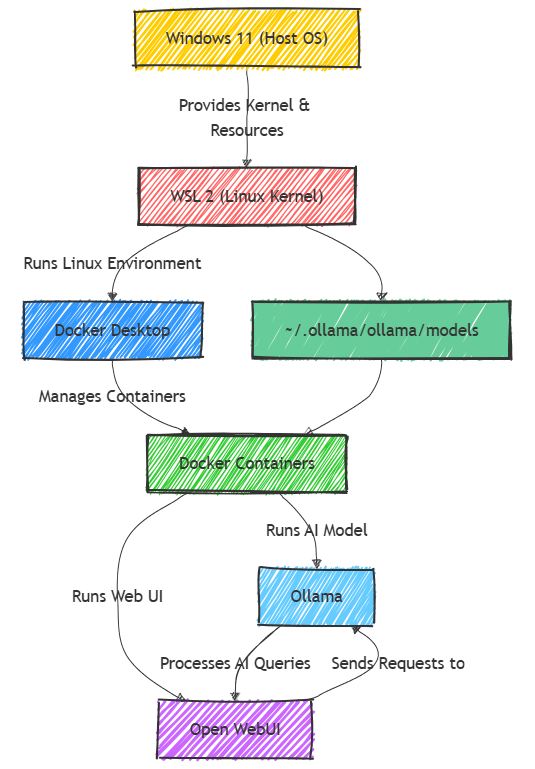
Diagram Representation#
Conclusion#
“By using Docker, we efficiently integrate Ollama AI models with Open WebUI. This setup ensures easy deployment, scalability, and consistent performance. Future enhancements can include setting up persistent storage for models and optimizing resource allocation.”

Comments: